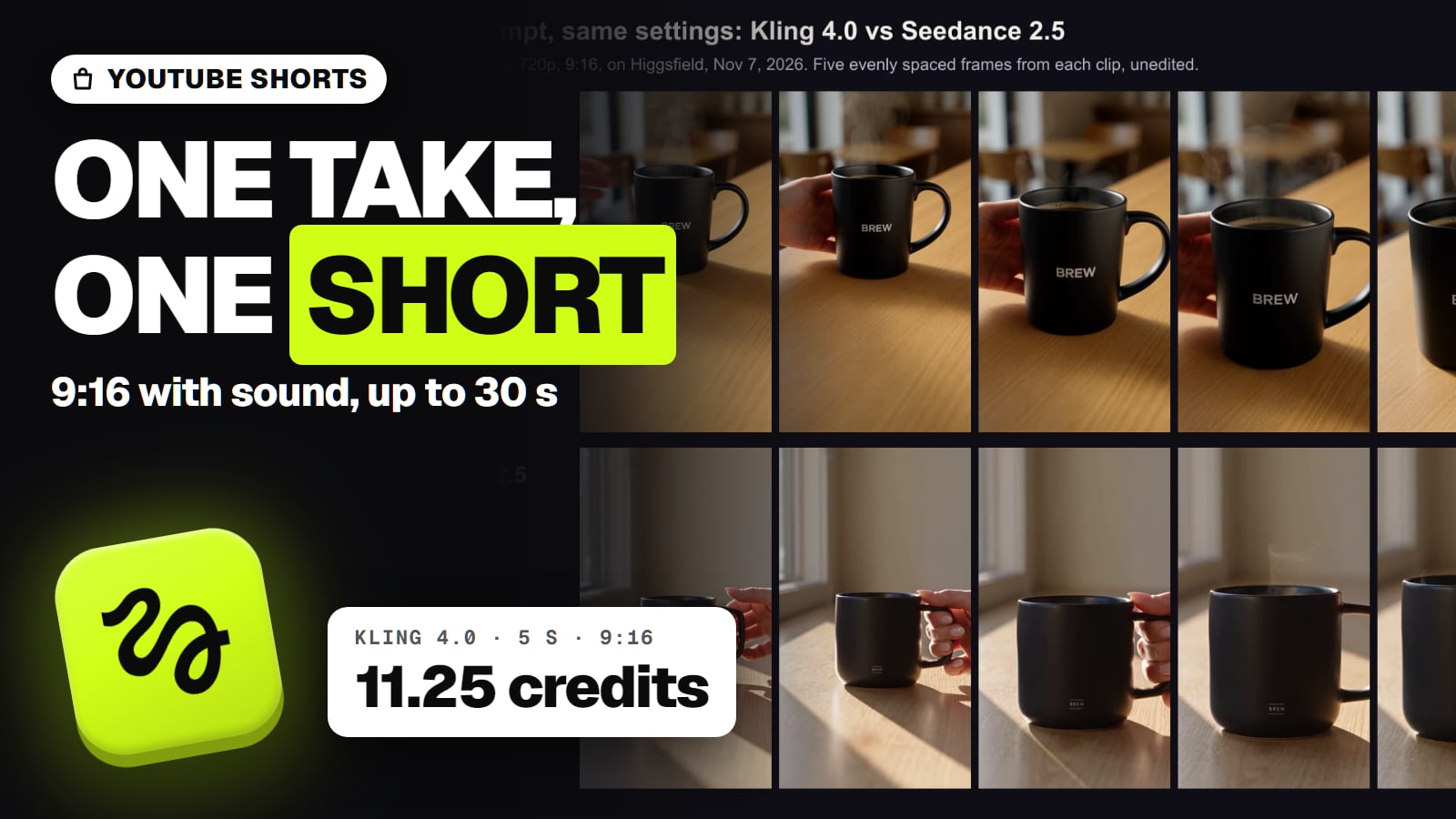
Google Flow's Veo 3.1 Lite and Fast make the cheapest 16:9 1080p B-roll with sound, about $1.60 to $3.20 a minute on Google AI Pro; Higgsfield's Kling 4.0 gives longer 30-second takes. Specs, per-minute costs, and YouTube's AI disclosure and inauthentic-content rules.
Some links on this page are referral links: we may earn a commission, at no cost to you.
Share
The best AI video generator for YouTube B-roll is Google Flow on a Google AI Pro plan, because Veo 3.1 Lite and Fast make 16:9 clips with native sound that Flow upscales to 1080p free for subscribers, at about $1.60 to $3.20 per finished minute; when you need takes longer than 8 seconds, Kling 4.0 on Higgsfield gives up to 30 seconds at 1080p (checked November 8, 2026). YouTube B-roll has four requirements a vertical-video tool doesn't: a 16:9 frame, 1080p or better, takes long enough to sit under a sentence of narration, and a price per minute you can sustain. Then come YouTube's own rules on AI footage, which decide whether the channel can earn at all. Specs and prices below are from the makers' pages; the per-minute costs are our arithmetic.
16:9 B-roll: frame, resolution, take length and cost per minute (makers' pages Nov 3 to Nov 8, 2026; per-minute cost is our arithmetic)
Veo 3.1 Lite, Google Flow on AI Pro
Highest resolution
1080p (Flow upscale, free for subscribers)
Take length
4, 6 or 8 s; extend
Native sound
Yes
One minute of B-roll
About $1.60 (8 takes x 10 credits)
Veo 3.1 Fast, Google Flow on AI Pro
Highest resolution
1080p
Take length
4, 6 or 8 s; extend
Native sound
Yes
One minute of B-roll
About $3.20 (8 x 20 credits)
MiniMax H3, Higgsfield
Highest resolution
2K
Take length
4 to 15 s
Native sound
Yes, stereo
One minute of B-roll
120 credits, about $3.96 to $5.90 (discounted price)
Hailuo 2.3, MiniMax API
Highest resolution
1080p
Take length
6 s at 1080p
Native sound
Not verified
One minute of B-roll
About $4.90 (10 x $0.49)
Gemini Omni 1.2 Flash, Gemini API
Highest resolution
1080p (upsampled)
Take length
3 to 15 s
Native sound
Yes
One minute of B-roll
About $6.24 ($0.104 a second)
Kling 4.0, Higgsfield
Highest resolution
1080p
Take length
3 to 30 s
Native sound
Yes, stereo
One minute of B-roll
195 credits, about $6.44 to $9.59
Wan 3.0, Higgsfield
Highest resolution
1080p
Take length
2 to 30 s
Native sound
Yes
One minute of B-roll
216 credits, about $7.13 to $10.63
Kling 3.0 at 4K, Higgsfield
Highest resolution
4K (native)
Take length
3 to 15 s
Native sound
Yes
One minute of B-roll
360 credits, about $11.88 to $17.71
Veo 3.1 Quality, Google Flow
Highest resolution
1080p; 4K upscale on Ultra only
Take length
8 s; extend
Native sound
Yes
One minute of B-roll
About $16.00 (8 x 100 credits)
Grok Imagine 1.5, xAI API
Highest resolution
1080p (native)
Take length
1 to 15 s
Native sound
Yes, lip-synced
One minute of B-roll
About $15.00 ($0.25 a second)
Seedance 2.5, Higgsfield
Highest resolution
1080p (Plus and up)
Take length
4 to 30 s
Native sound
Yes
One minute of B-roll
960 credits, about $31.68 to $47.23
Highest resolution
Take length
Native sound
One minute of B-roll
Veo 3.1 Lite, Google Flow on AI Pro
1080p (Flow upscale, free for subscribers)
4, 6 or 8 s; extend
Yes
About $1.60 (8 takes x 10 credits)
Veo 3.1 Fast, Google Flow on AI Pro
1080p
4, 6 or 8 s; extend
Yes
About $3.20 (8 x 20 credits)
MiniMax H3, Higgsfield
2K
4 to 15 s
Yes, stereo
120 credits, about $3.96 to $5.90 (discounted price)
Hailuo 2.3, MiniMax API
1080p
6 s at 1080p
Not verified
About $4.90 (10 x $0.49)
Gemini Omni 1.2 Flash, Gemini API
1080p (upsampled)
3 to 15 s
Yes
About $6.24 ($0.104 a second)
Kling 4.0, Higgsfield
1080p
3 to 30 s
Yes, stereo
195 credits, about $6.44 to $9.59
Wan 3.0, Higgsfield
1080p
2 to 30 s
Yes
216 credits, about $7.13 to $10.63
Kling 3.0 at 4K, Higgsfield
4K (native)
3 to 15 s
Yes
360 credits, about $11.88 to $17.71
Veo 3.1 Quality, Google Flow
1080p; 4K upscale on Ultra only
8 s; extend
Yes
About $16.00 (8 x 100 credits)
Grok Imagine 1.5, xAI API
1080p (native)
1 to 15 s
Yes, lip-synced
About $15.00 ($0.25 a second)
Seedance 2.5, Higgsfield
1080p (Plus and up)
4 to 30 s
Yes
960 credits, about $31.68 to $47.23
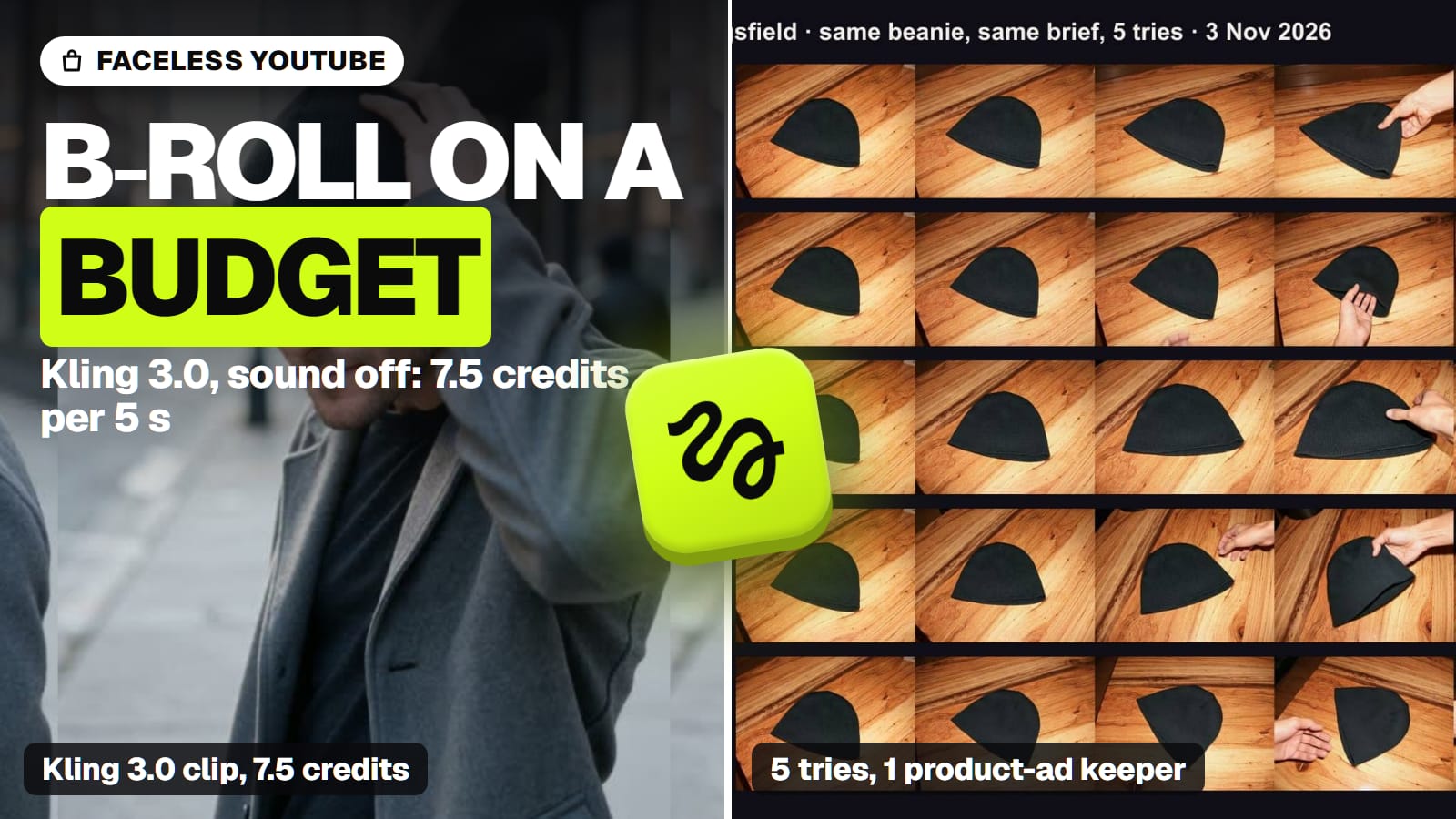
How we got the numbers: one minute is 60 seconds of finished footage, built from the clip prices each maker or Higgsfield showed: 5-second Higgsfield prices times 12 (10-second Kling 4.0 times 6), 8-second Veo takes times 8 (64 seconds), 6-second Hailuo clips times 10, API prices per second times 60. Higgsfield dollars run from Ultra billed yearly ($99 a month for 3,000 credits, about $0.033 a credit) to Plus billed monthly ($59 for 1,200, about $0.049); Flow credits are $0.02 each on Google AI Pro. Every model above outputs 16:9 per its maker's docs or Higgsfield's catalogue, except Hailuo 2.3, whose aspect ratios we couldn't verify. All of it assumes every take is usable, and none is: in our 10-clip product test we kept 1 of 5 Kling 3.0 clips and 3 of 5 Seedance 2.5 clips. Budget two to five times these figures for the takes you'll throw away. Other jobs are ranked on our best AI video generator hub.
Google Flow: the cheapest 1080p B-roll with sound
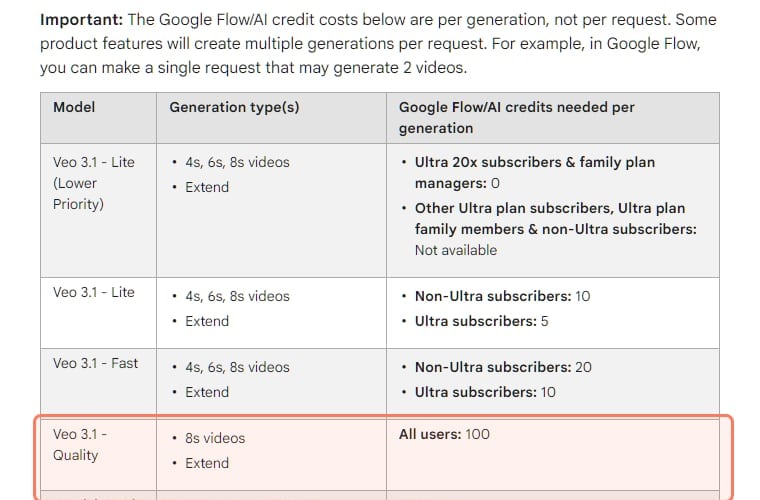
Veo 3.1 comes in three versions, and Google's Vertex AI docs give all three the same frame options, "9:16, 16:9", takes of 4, 6 or 8 seconds, video extension and sound generation (read Nov 8). Veo 3.1 itself outputs up to 4K on Vertex; Fast and Lite output 720p or 1080p. In Google Flow, the filmmaking tool on Google's consumer plans, 1080p upscaling is free for Plus, Pro and Ultra subscribers, and 4K upscaling is Ultra-only.
The per-generation cost table on Google's Flow credits page, read November 3, 2026. · Screenshot of support.google.com by aliteq
Google AI Pro is $19.99 a month for 1,000 Flow credits, $0.02 a credit. That's 100 Lite generations (about 13 minutes of 8-second takes) or 50 Fast generations (about 6.7 minutes) a month, our arithmetic, plus the 50 daily credits Google's credits page gives on top. Google AI Plus, at $4.99, adds 200 credits, though its card names Gemini Omni Flash rather than Veo, and its FAQ describes Veo 3.1 Lite on Pro as a "limited trial". For a narrated documentary channel cutting a new shot every few seconds, 8-second takes are rarely the constraint; for a slow establishing shot, they are, and Flow's Extend is the workaround. Is Veo 3 free has the free-credit and plan details.
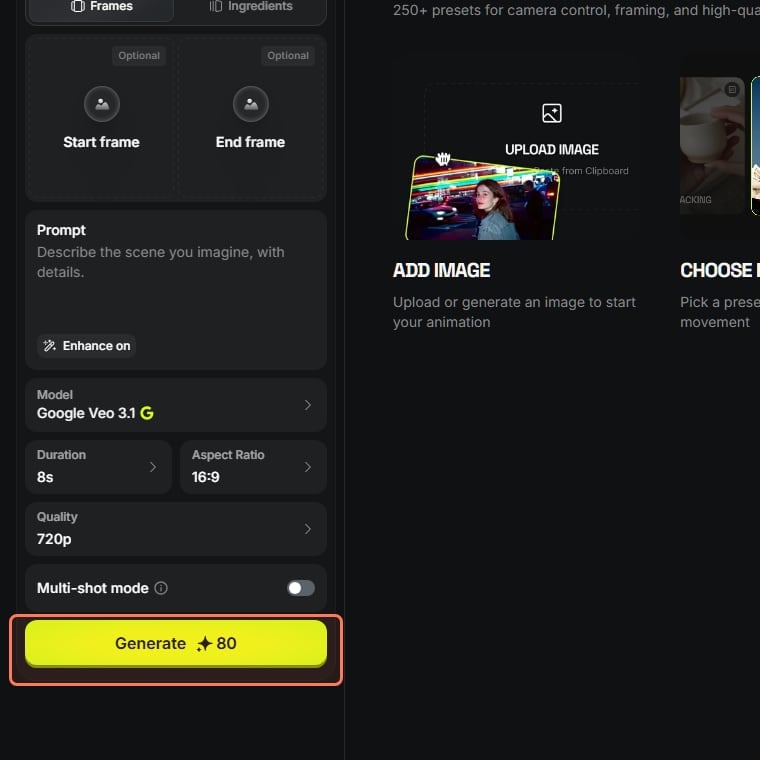
If you'd rather run Veo inside a multi-model plan, Higgsfield hosts it too: on November 3 an 8-second 16:9 Veo 3.1 clip cost 80 Higgsfield credits, Veo 3.1 Fast 32 and Veo 3.1 Lite 16 at 1080p. That's dearer per clip than Flow (an 8-second Veo 3.1 clip is about $2.64 on Higgsfield Ultra billed yearly against $2.00 on Flow, our arithmetic), so it's worth it only if you'll use Higgsfield's other models as well.
Higgsfield's video page with Google Veo 3.1 selected, 8 seconds, 16:9 (higgsfield.ai, read November 3, 2026, logged out). The outline is ours. · Screenshot of higgsfield.ai by aliteq
Longer 16:9 takes: Kling 4.0, Wan 3.0 and Seedance 2.5
Three models make takes of up to 30 seconds in one generation, long enough to hold under a whole paragraph of narration:
Kling 4.0 (Kuaishou): 3 to 30 seconds, frames from 21:9 to 9:16 and 720p or 1080p on Higgsfield, with stereo sound generated with the picture. Kling's own guide marks 4K and 10-bit HDR as "coming soon", so don't plan a 4K channel on it yet. On Higgsfield a 10-second 1080p clip was 32.5 credits on November 7, a launch discount on a listed 40. More on our Kling hub.
Wan 3.0 (Alibaba): 2 to 30 seconds at 480p to 1080p with an audio toggle, per Alibaba's Model Studio docs; 18 Higgsfield credits per 5 seconds at 1080p on November 3 (28 listed).
Seedance 2.5 (ByteDance): 4 to 30 seconds with audio and video generated together, up to 1080p on Higgsfield's Plus plan and above, but 80 credits per 5 seconds at 1080p, the dearest option here by far. Choosing between Kling and Seedance? Kling vs Seedance covers our one side-by-side run, which was vertical 720p, so it says nothing about 16:9 1080p.
For 4K, Kling 3.0 is the one with a native 4K mode: 30 Higgsfield credits per 5-second clip with sound (Nov 3), up to 15 seconds. MiniMax H3 sits between, at 2K and up to 15 seconds with stereo sound; its 10-credit price per 5 seconds on November 3 was a discount from 20.
YouTube's two AI rules that decide whether it pays
The model is the easy part. YouTube has two separate policies that touch AI footage, and channels confuse them.
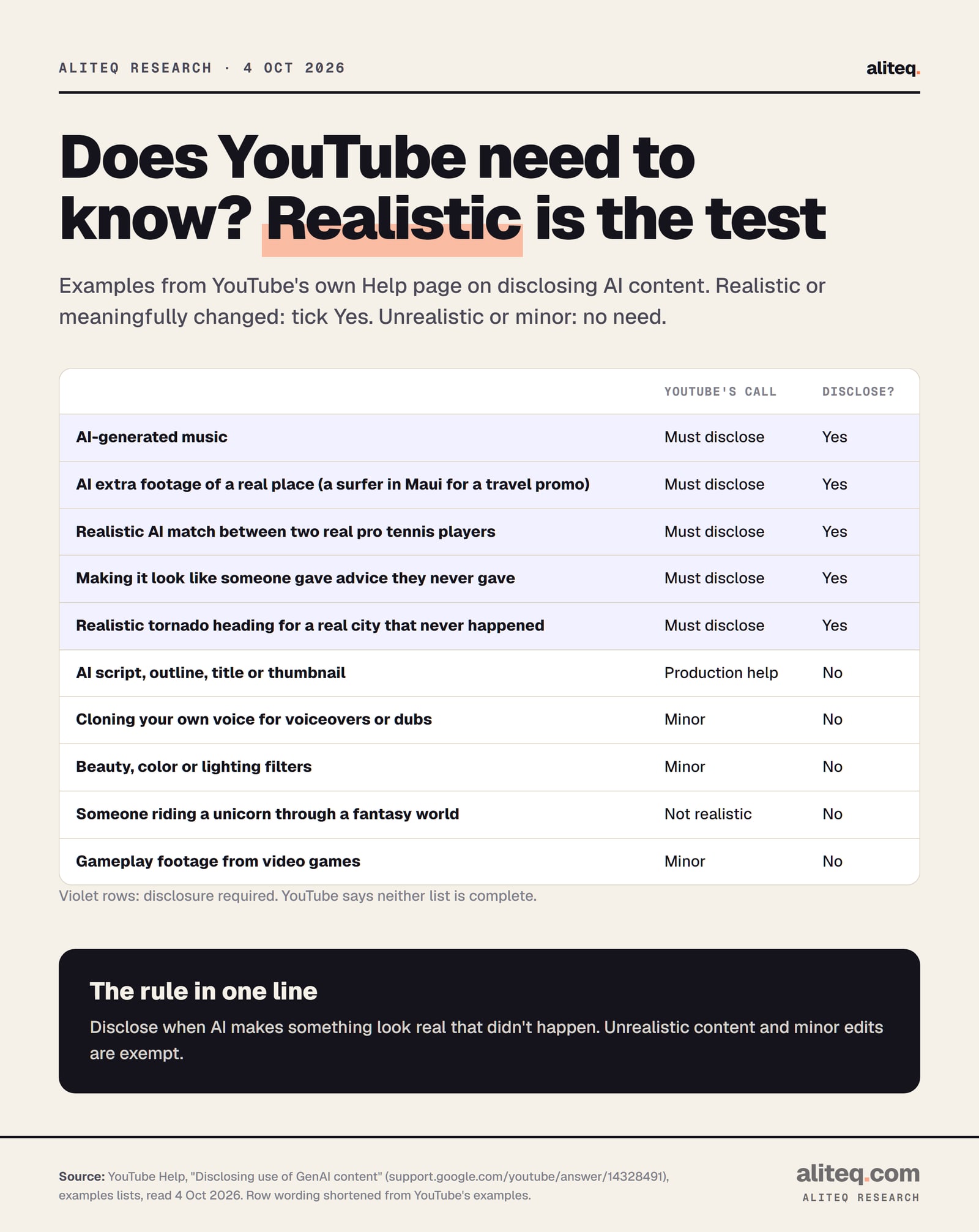
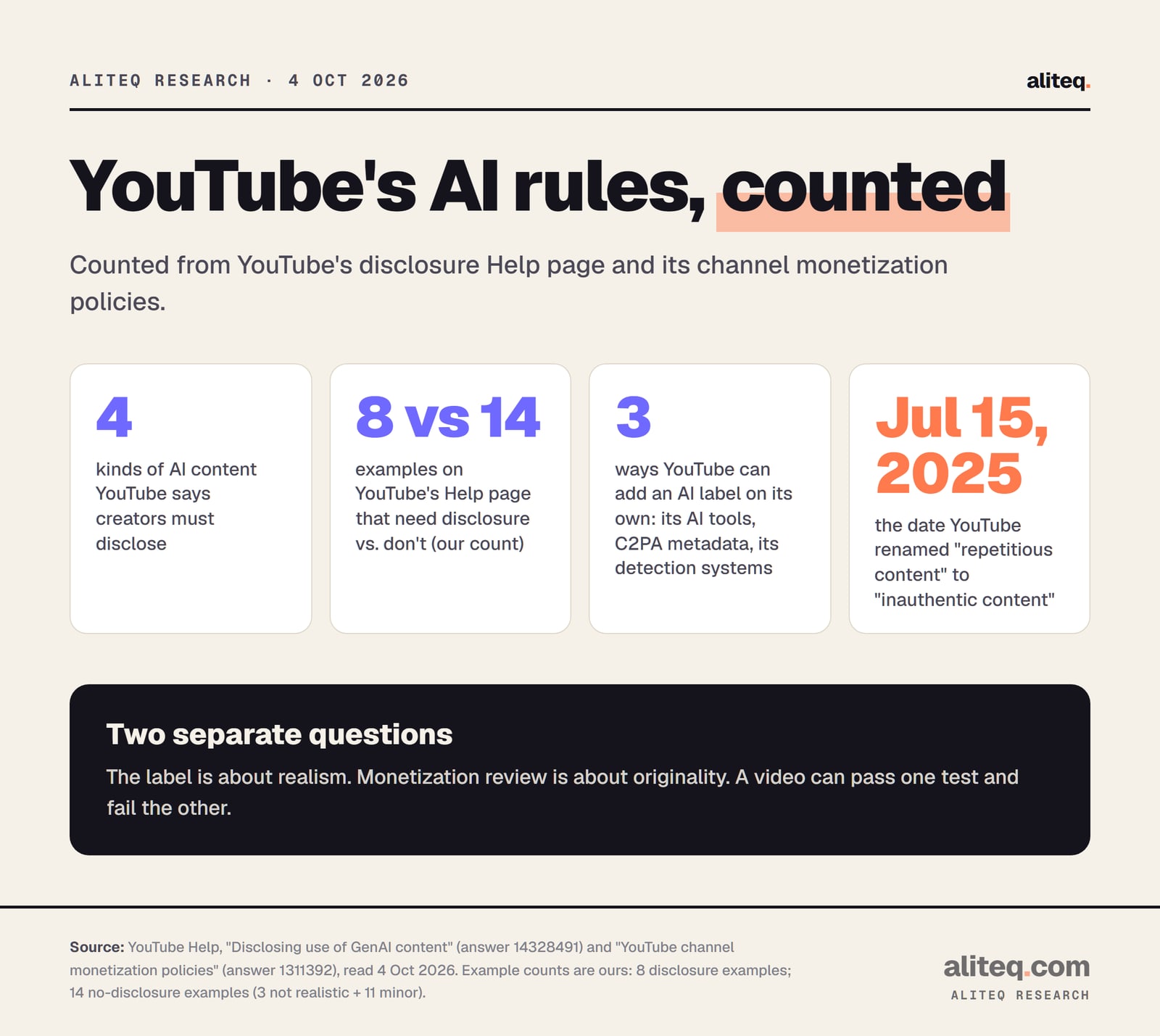
1. Disclosure is about realism, not money. YouTube's disclosure help page says "We require creators to disclose AI-generated or altered content that seems realistic", through the "AI use" setting in YouTube Studio's attributes. It isn't needed for clearly unrealistic content, minor edits, or production help such as scripts, thumbnails and titles. The same page says "Disclosing AI content alone won't limit a video's audience or impact its eligibility to earn money", but creators who consistently don't disclose face "penalties from YouTube, including removal of content or suspension from the YouTube Partner Program" (read Nov 8). Realistic AI B-roll of a real city, a real event or a realistic person is the kind that needs the setting switched on.
Ten of YouTube's own examples, shortened. Source: YouTube Help, Disclosing use of GenAI content, read October 4, 2026. · aliteq research
2. Monetization is about originality. YouTube's monetization policies renamed "repetitious content" to "inauthentic content" in a notice dated July 15, 2025, and the policy covers content "that looks like it's made with a template" or feels repetitive across a channel's videos. Two of its not-allowed examples are aimed straight at AI channels: "AI-generated content made with generic or unoriginal templates giving the impression of mass production" without "adding the creator's original, authentic insights or perspective", and "Image slideshows, templated storylines, or scrolling text with minimal or no narrative, commentary, or educational value". The review looks at the channel as a whole.
The example counts are ours, from YouTube's disclosure Help page. Sources: YouTube Help pages 14328491 and 1311392, read October 4, 2026. · aliteq research
So the generator doesn't make a channel monetizable or not; the script, the narration and the editing do. AI B-roll under an original, researched voiceover is the use YouTube's examples leave room for. A channel of near-identical AI clips with a template script is the use they rule out. The full rule set is in YouTube's altered or synthetic content rule, explained, and the workflow around it in how to start a faceless YouTube channel with AI. Nothing here promises a channel will be approved or earn.
Shorts are a different job
YouTube Shorts can now run up to three minutes, in a square or vertical frame (YouTube Help, read Nov 8). That flips the spec: 9:16 instead of 16:9, and most of the models above make both. If one shoot has to feed a long video and Shorts, generate the two frames separately rather than cropping 16:9 to vertical, which throws away most of the picture.
The best AI video generator for other jobs
Each page below answers one job from the same checked facts. All of them, grouped by job, are in our best AI video generator guide.
Best free AI video generator: Google Flow's 50 daily credits are the biggest free allowance; Dreamina's 120 a day is the US runner-up.
What we couldn't verify
Image quality at 16:9 1080p. We haven't generated 16:9 B-roll with any of these models; our only side-by-side (Kling 4.0 vs Seedance 2.5, Nov 7) was vertical 720p.
Hailuo 2.3's aspect ratios and sound. MiniMax and Higgsfield don't state them.
Runway Gen-4.5's length, resolution and 16:9 support. Runway's help center refused our reads; at the Standard rate, 60 credits per 5 seconds would be about $17.28 a minute, resolution unknown.
How long Higgsfield's discounts last (Kling 4.0, MiniMax H3, Wan 3.0 listed prices are higher).
The price of a 30-second take. Our per-minute figures multiply 5- or 10-second prices; Higgsfield may price a single 30-second generation differently.
Verdict
Google Flow for B-roll; Kling 4.0 for long takes
For most YouTube channels, Google Flow on Google AI Pro is the best AI video generator for B-roll: 16:9, 1080p with a free upscale, native sound, and about $1.60 to $3.20 a finished minute on Veo 3.1 Lite or Fast, with 8-second takes. Use Kling 4.0 on Higgsfield when a shot needs to run longer (up to 30 seconds at 1080p, about 195 credits a minute), and Kling 3.0 when you need native 4K. Whatever you use, switch on AI use for realistic footage and keep your own narration and research at the centre of every video.
Best for: YouTubers and faceless channels who need 16:9 AI B-roll at a sustainable cost
Frequently asked
What is the best AI video generator for YouTube?
For 16:9 B-roll, Google Flow on a Google AI Pro plan: Veo 3.1 Lite and Fast make 16:9 clips with sound, upscaled to 1080p free for subscribers, for about $1.60 to $3.20 per finished minute by our arithmetic. For longer takes, Kling 4.0 on Higgsfield runs up to 30 seconds at 1080p (read Nov 3 to Nov 8, 2026).
Can you monetize AI-generated videos on YouTube?
AI isn't banned, but YouTube's monetization policy says AI-generated content made with generic or unoriginal templates giving the impression of mass production, without the creator's own insight, isn't eligible. Videos built around your own narration, research or commentary are the kind its examples allow.
Do I have to label AI videos on YouTube?
Yes, when the AI content seems realistic. YouTube asks creators to switch on the AI use setting in YouTube Studio; it's not needed for clearly unrealistic content or for AI help with scripts, titles and thumbnails. YouTube says disclosure alone won't limit a video's audience or its eligibility to earn money.
How much does AI B-roll cost per minute?
By our arithmetic from the makers' prices: about $1.60 (Veo 3.1 Lite) to $3.20 (Veo 3.1 Fast) in Google Flow on Google AI Pro, about 120 Higgsfield credits for MiniMax H3 at 2K, 195 for Kling 4.0 at 1080p and 960 for Seedance 2.5 at 1080p. Rejected takes add to that.
Which AI video generator makes 4K for YouTube?
Kling 3.0 has a native 4K mode (30 Higgsfield credits per 5-second clip with sound on Nov 3, 2026), and Veo 3.1 outputs 4K on Google's Vertex AI; in Google Flow, 4K upscaling is limited to Ultra subscribers. Kling 4.0's 4K is marked coming soon.
Is Sora good for YouTube videos?
Sora is no longer available: OpenAI shut down the Sora app on April 26, 2026 and its API on September 24, 2026. Higgsfield doesn't host Sora.
The short version: pick the generator by frame, take length and cost per minute, and let your own script carry the channel. Google Flow is the cheap default; Higgsfield is where the long and 4K takes live next to each other.