Kling: Kling 3.0 animates your own drawing from its first frame, and Kling 3.0 Omni and 4.0 hold one character across scenes with reference images, at 15 credits for a 10-second scene with sound off. Which models are photoreal-first, the open-source route, and why animation skips most AI labels.
Some links on this page are referral links: we may earn a commission, at no cost to you.
Share
The best AI animation generator for a stylised, 2D or cartoon look is Kling, because it starts from your own drawing and can hold one character across scenes: Kling 3.0 animates a picture you give it as the first frame, and Kling 3.0 Omni and Kling 4.0 take reference images of the character. Higgsfield's own model guide (updated November 6, 2026) sends "stylized, cinematic, or long-form video" to Kling. A 10-second scene on Kling 3.0 with sound off is about 15 credits on Higgsfield, by our arithmetic from its Generate button on November 3, 2026. We read every model's description and inputs on the makers' and Higgsfield's own pages through November 8, 2026. Other jobs, from Shorts to music videos, are on our best AI video generator hub.
Which AI video models can animate a drawn or cartoon character?
The deciding question for animation is control over the look: can you hand the model your character, and does it keep that character from scene to scene? Here is what each model accepts and how its own maker, or Higgsfield's catalogue, describes it (read through Higgsfield's connector, nothing generated, Nov 8, 2026).
AI video models for stylised animation (Nov 2026)
Kling 3.0
Start from your drawing
Start and end frame, 3 to 15 s
Keep a character across scenes
Via the frames you supply
How it's described
Higgsfield's guide: stylized, cinematic or long-form video
Kling 3.0 Omni
Start from your drawing
A separate Frames mode takes first and last frames
Keep a character across scenes
Up to 7 reference images, multi-shot
How it's described
Higgsfield: video from text and up to seven reference images
Kling 4.0
Start from your drawing
Start frame and up to 10 keyframes
Keep a character across scenes
Up to 10 images (Kling's guide); up to 7 elements on Higgsfield
How it's described
Higgsfield: text, keyframes, references or editing a video
Two things stand out. First, no model's own description promises a cartoon or 2D style; even Higgsfield's genre switches (on Cinema Studio and Seedance 2.0) are live-action film genres like action, horror, comedy, noir and drama. Second, every model takes a start frame. That's the opening: the start frame decides the style, so the work moves to making a good first picture.
In our November 3 product test, Kling 3.0 given a photo as its start frame kept that photo's scene and framing in all five tries (our cost-per-usable-clip test). For a product ad that stubbornness was a drawback. For animation, where the first frame is a drawing you made, it's what you want: the model animates your picture instead of replacing it with its idea of the scene. We haven't run Kling 3.0 on a drawing, so treat that as a reason to test, not a result.
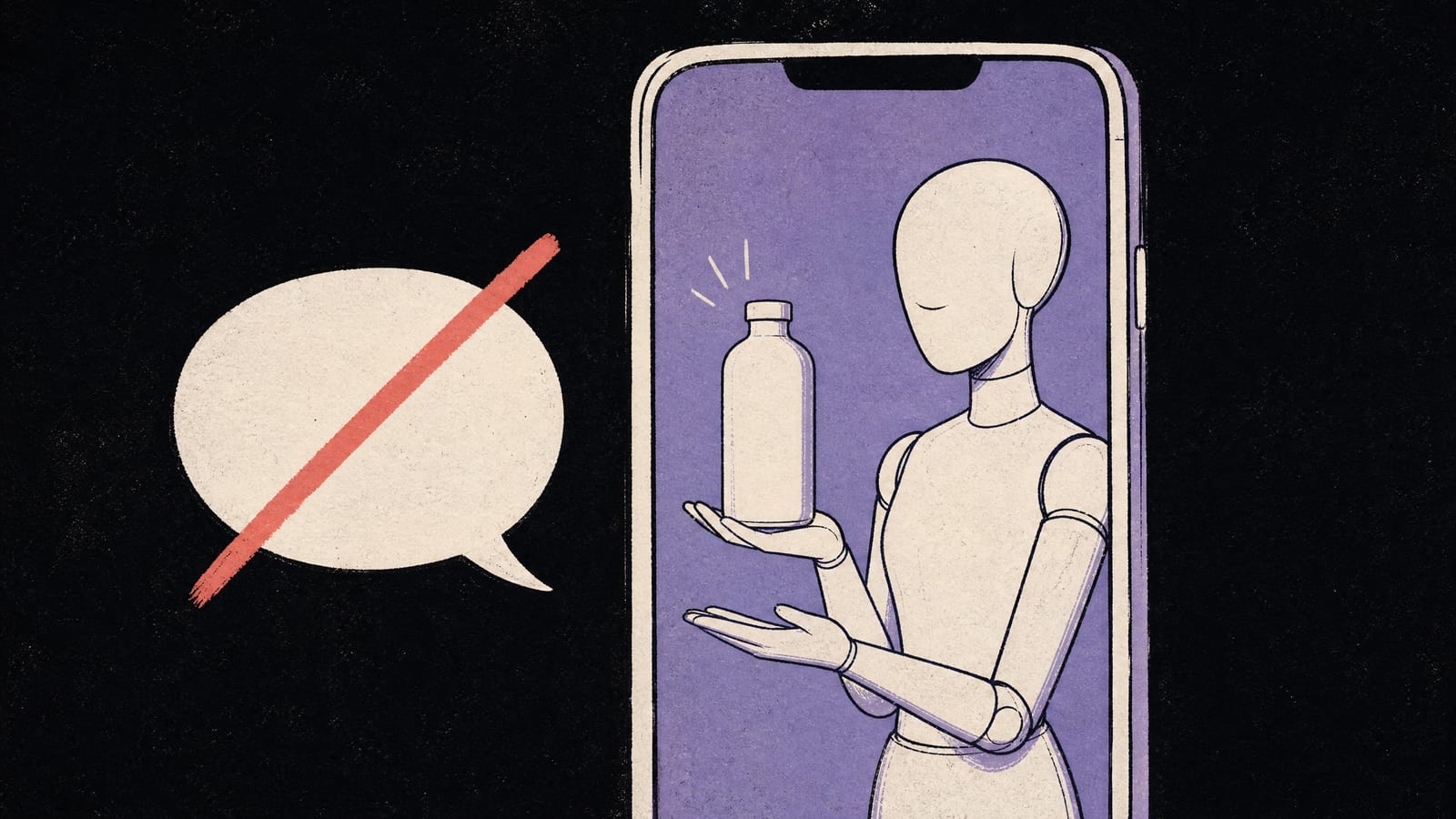
The kind of flat, hand-drawn still you'd hand a video model as its start frame. Made by us with Higgsfield's GPT Image 2 for another guide on October 26, 2026; we haven't animated it. · Generated with Higgsfield (GPT Image 2) by aliteq
How do you keep the same character in every scene?
Make a reference sheet first, then pick the way you'll feed it in:
Make the character once: front, side and three-quarter views in your style, as still images, before any video.
Animate single shots from a start frame (Kling 3.0): the drawing fixes the look, and an end frame can fix where the shot lands.
For new scenes, give the character as references (Kling 3.0 Omni up to 7 images, Kling 4.0 up to 10 images and 7 elements) and describe the scene in the prompt.
Chain shots: use the last frame of one clip as the start frame of the next, so cuts don't jump.
Budget retries: a model that drifts on one detail costs a full clip to redo.
How well references hold a character is the hard part, and it's measurable. In our same-face test (Oct 27, images rather than video, and a photoreal face rather than a drawn one), one reference portrait went into eight new scenes on two image models: Seedream 5.0 Pro kept all five face details in 6 of 8 scenes, Nano Banana 2 in 4 of 8, and the misses were small things like faded freckles and earrings nobody asked for. Expect the same kind of drift on a drawn character, and check every shot against your sheet. For still character sheets, Higgsfield's model guide points to its Soul model, whose "biggest strength is character consistency".
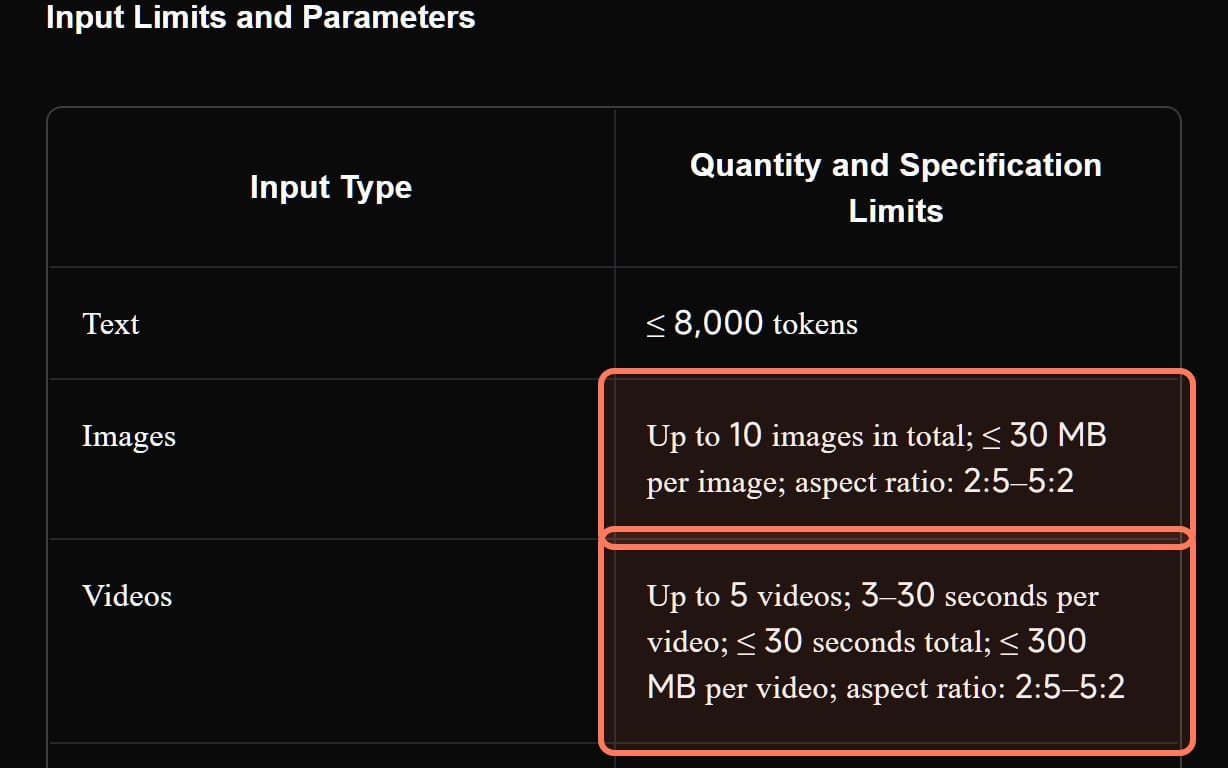
Kling 4.0's reference limits from Kling's own user guide (kling.ai, read November 7, 2026): up to 10 images and 5 videos per generation, the room you have for a character sheet. Outlines ours. · Screenshot of kling.ai by aliteq
What does one animated scene cost?
We priced one 10-second scene at 720p, first try, from the 5-second credit price Higgsfield's Generate button showed on the date in brackets (our arithmetic; the button prices your exact length). Dollars use Plus at $59 for 1,200 credits.
One 10-second animated scene at 720p on Higgsfield (our arithmetic, Nov 2026)
Grok Imagine 1.5 Lite10 credits, about $0.49
5 per 5 s, sound always on (Nov 8)
Veo 3.1 Lite, 8 s12 credits, about $0.59
8 s is its longest take (Nov 3)
Kling 3.0, sound off15 credits, about $0.74
7.5 per 5 s (Nov 3)
Wan 3.018 credits, about $0.89
9 per 5 s (Nov 3)
Kling 4.022.5 credits, about $1.11
11.25 per 5 s, discounted (Nov 7)
Seedance 2.570 credits, about $3.44
35 per 5 s (Nov 7)
A two-minute episode is twelve such scenes: about 180 credits on Kling 3.0 with sound off, or about 360 if every scene needs one retry. That fits Plus with room to spare; Starter's 270 credits ($19) cover about one and a half episodes without retries, and its card says "selected models only". Kling 3.0 Omni and Kling 4.0 Flash weren't priced in our reads. If you'll add your own music and voices, switch Kling 3.0's sound off; the catalogue says off costs fewer credits. Sound-heavy scenes can stay on: 10 credits per 5 seconds with sound (Nov 3).
Which models are photoreal-first?
Be honest about what a model was built for. Higgsfield's catalogue describes Google's Veo 3.1 as "Ultra-realistic, top-tier cinematic quality" and MiniMax's Hailuo as "Natural physics, facial emotion" with a "realistic" tag, and Higgsfield's model guide sends "realistic human motion" to Seedance. They'll animate a drawn start frame, but their strengths are skin, light and physics. If the result keeps drifting towards realism, that's the model doing what it's for; try Kling or Wan on the same frame before rewriting the prompt.
Not on Higgsfield, but worth knowing:
Luma Ray3.2 says its Ray3 models keep characters consistent from a single reference image, makes 5- or 10-second clips with no natively generated audio, and costs 100 credits per 5 seconds at 720p on its $30 Plus plan, about $0.30 (Luma's pages, Nov 8). Silent output is fine when you'll add your own soundtrack.
Wan 2.2 Animate-14B, open-source under Apache 2.0, does "Character animation and replacement": per Alibaba's README, it "takes a video and a character image as input" and makes the character mimic the motion in the video. You record or find the motion, it moves your character. The README gives no memory figure for Animate-14B; it says the 14B sample commands for its other models need a GPU with at least 80 GB, so plan on a rented data-centre card. Cloud GPUs for ComfyUI and Wan and our live cloud GPU prices cover that route.
Sora 2 is gone: OpenAI discontinued it in 2026 (is Sora 2 free).
On Higgsfield, the same motion-from-a-video idea is sold as Genjutsu, which its catalogue describes as transferring motion "from a reference video to subjects in reference images" (what Higgsfield Genjutsu is). We haven't tried it on a drawn character.
Do AI animations need an AI label?
Usually not, which is one practical advantage over photoreal AI video.
YouTube asks creators to disclose AI content that seems realistic, and one of its own examples that doesn't need it is "Using an AI-generated or altered animation of a missile in a fully animated video" (YouTube's altered or synthetic content label).
Meta lists "Video of an outdoor landscape, created in a style resembling a cartoon" among content that doesn't require its AI label.
TikTok requires a label on AI content "that shows realistic-looking scenes or people", which a clearly drawn animation doesn't.
The exemption depends on the result looking clearly animated. A semi-realistic 3D render of a real-looking person is closer to the realistic case; label it when in doubt. Monetisation rules are separate: YouTube still won't monetise mass-produced, templated AI videos, animated or not.
The best AI video generator for other jobs
Each page below answers one job from the same checked facts. All of them, grouped by job, are in our best AI video generator guide.
Best AI anime video generator: Kling 4.0: its maker documents animation styles, and it takes 10 reference images of your own character.
Best image to video AI: Seedance 2.5 to put your photo's subject in a new scene; Kling 3.0 when the photo is already the first frame.
Best AI music video generator: Kling 3.0 with sound off for the footage, plus Sync Lipsync 3 for sung shots: about 270 credits per 3-minute song.
Best text to video AI: Kling 4.0: up to 30 seconds per prompt, multi-shot and stereo sound; Google Flow and Dreamina for free tries.
Best open source AI video generator: Wan 2.2 (Apache 2.0): the 5B fits 8 GB, the 14B runs on a 24 GB card; MiniMax H3's licence excludes the US.
What we couldn't verify
How any model handles a drawn or 2D start frame. Our video tests used photos and text prompts; we haven't animated a drawing on any model, so the pick rests on inputs, descriptions and price.
Whether Wan 2.6 has open weights. Higgsfield's catalogue calls it "Open-weight"; we found no Wan 2.6 weights from Alibaba.
Prices for Kling 3.0 Omni, Kling 4.0 Flash, Genjutsu and Draw To Video. Not recorded. Higgsfield's catalogue lists a Draw To Video tool with no description, and we didn't try it.
Wan 2.2 Animate-14B's memory needs. The README doesn't state them.
Luma's free-plan rules. Its licensing page is from 2025 with old plan names.
Whether a 10-second take costs exactly two 5-second ones. Our scene prices scale Higgsfield's 5-second figures.
4/ 10
Verdict
Kling, from your own drawing
Kling is the AI animation generator to start with: Kling 3.0 animates your own drawing from its first frame for about 15 credits per 10-second scene with sound off, and Kling 3.0 Omni and Kling 4.0 carry one character across scenes with reference images. Keep Veo, Hailuo and Seedance for realistic work, and use Wan 2.2 Animate-14B on a rented GPU when you want to drive a character with your own motion.
Best for: Creators making stylised, 2D or cartoon-style animated videos with a recurring character
AI animation generators: common questions
What is the best AI animation generator?
Kling, checked Nov 8, 2026. Higgsfield's model guide sends stylised video to Kling; Kling 3.0 animates a drawing you give it as the start frame, and Kling 3.0 Omni and Kling 4.0 take reference images to keep a character consistent. A 10-second scene on Kling 3.0 with sound off is about 15 credits on Higgsfield.
Can AI animate my own drawing?
Yes, through image-to-video: give the drawing as the start frame. Kling 3.0, Seedance, Wan 3.0, Veo 3.1, Hailuo and Grok Imagine all accept a start image. The drawing sets the style; the prompt describes the motion.
How do I keep an AI cartoon character consistent?
Make a character sheet first, then feed it as reference images (Kling 3.0 Omni takes up to seven, Kling 4.0 up to 10 images and 7 elements), and chain shots by starting each clip on the last frame of the one before. Check every shot against the sheet; small details drift.
Is there a free or open-source AI animation generator?
Alibaba's Wan 2.2 is open-source under Apache 2.0, including Animate-14B, which makes a character image copy the motion in a video. It runs on your own or a rented GPU; the README's 14B sample commands for its other models call for at least 80 GB of memory.
Do I need to label AI animation on YouTube?
Usually not. YouTube's disclosure rule covers AI content that seems realistic, and its own examples of content that doesn't need it include an AI-generated animation in a fully animated video. Meta also exempts cartoon-style video from its AI label.
The short version: AI video models are realistic by default, so bring the style yourself. Draw the character, start every shot from your own frame, and use Kling's reference modes to keep the character from scene to scene.