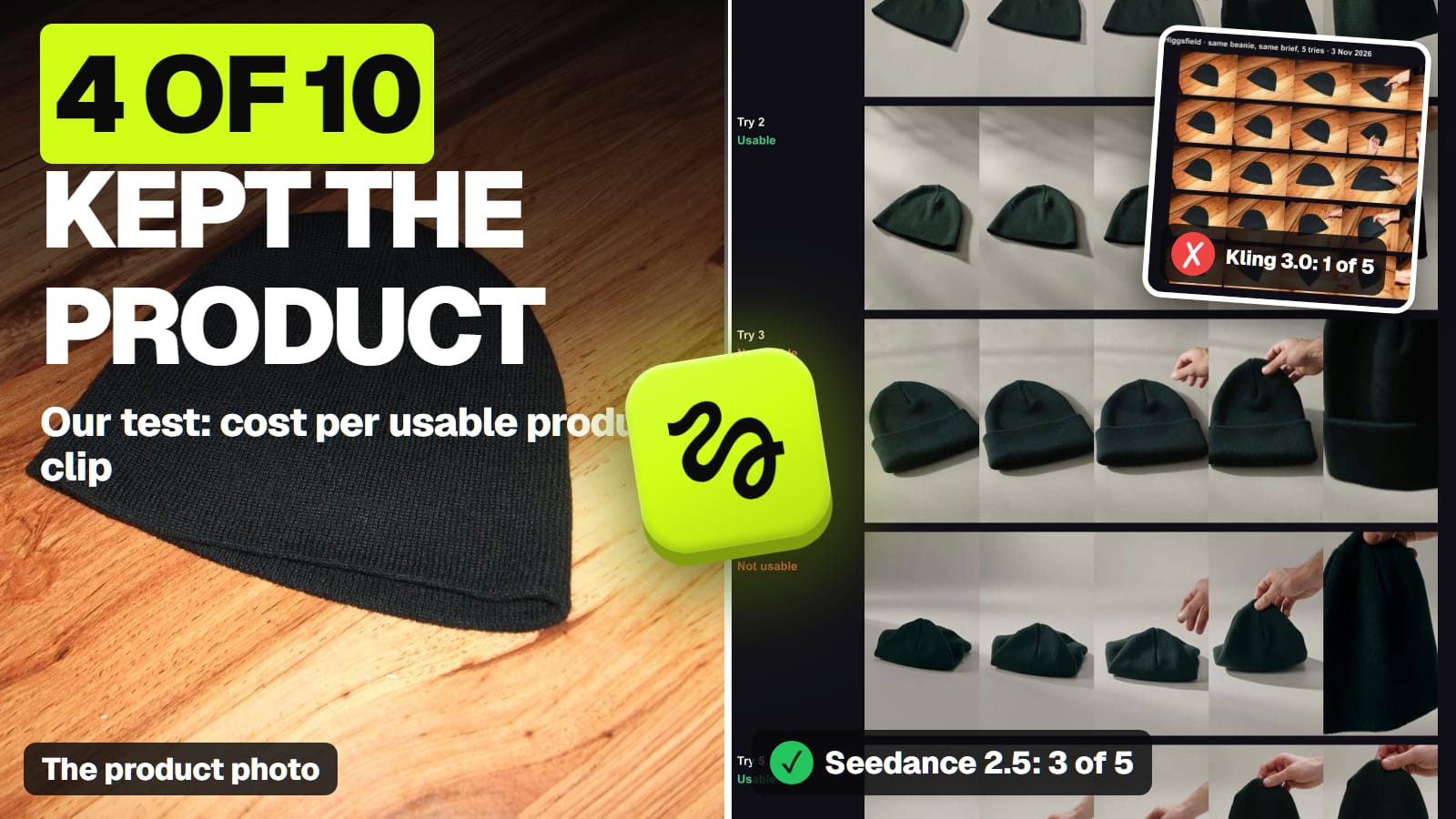
Seedance 2.5 kept our product right in 3 of 5 tries, Kling 3.0 in 1 of 5, so Seedance is our pick when the product must not change, and Kling 3.0 when your photo already is the shot. Kling 4.0 drew a logo most clearly. Cost per usable clip, from our own runs on Higgsfield.
Some links on this page are referral links: we may earn a commission, at no cost to you.
Share
The best AI video generator for product videos is Seedance 2.5 on Higgsfield when the product must not change, because in our own 10-clip test it kept a real product right in 3 of 5 tries, against 1 of 5 for Kling 3.0. That makes Seedance about 58 credits per usable 5-second clip, roughly $1.93 to $2.87 depending on the plan. Kling 3.0 is cheaper per keeper, about 37.5 credits, but it copies your photo's background and shape, so it suits a product photo that already is the shot. For a logo or printed text, Kling 4.0 drew it most clearly in our one-try comparison. We ran both tests on Higgsfield on November 3 and November 7, 2026, and every frame is published.
Product video from a product photo: what decides it (our tests and vendor pages, Nov 3 to Nov 8, 2026)
Seedance 2.5 (Higgsfield)
How it uses your photo
As a reference; builds a new scene from the brief
Kept the product right
3 of 5 (our test)
Credits, 5 s at 720p
35
Credits per usable clip
About 58
Kling 3.0 (Higgsfield)
How it uses your photo
As the start frame; keeps the photo's background and shape
Kept the product right
1 of 5, 2 if trimmed (our test)
Credits, 5 s at 720p
7.5 without sound
Credits per usable clip
About 37.5
Kling 4.0 (Higgsfield)
How it uses your photo
Up to 10 reference images, 10 keyframes (Kling's guide)
Kept the product right
Not in the product test; clearest logo in one try
Credits, 5 s at 720p
11.25 (launch discount)
Credits per usable clip
Not measured
Grok Imagine 1.5 Lite (Higgsfield)
How it uses your photo
Start frame only; no reference images on Lite
Kept the product right
Not tested
Credits, 5 s at 720p
5
Credits per usable clip
Not measured
Veo 3.1 (Flow or Vertex)
How it uses your photo
First and last frame; reference images on Generate and Fast, not Lite
Kept the product right
Not tested
Credits, 5 s at 720p
No 5 s option (4, 6 or 8 s)
Credits per usable clip
Not measured
How it uses your photo
Kept the product right
Credits, 5 s at 720p
Credits per usable clip
Seedance 2.5 (Higgsfield)
As a reference; builds a new scene from the brief
3 of 5 (our test)
35
About 58
Kling 3.0 (Higgsfield)
As the start frame; keeps the photo's background and shape
1 of 5, 2 if trimmed (our test)
7.5 without sound
About 37.5
Kling 4.0 (Higgsfield)
Up to 10 reference images, 10 keyframes (Kling's guide)
Not in the product test; clearest logo in one try
11.25 (launch discount)
Not measured
Grok Imagine 1.5 Lite (Higgsfield)
Start frame only; no reference images on Lite
Not tested
5
Not measured
Veo 3.1 (Flow or Vertex)
First and last frame; reference images on Generate and Fast, not Lite
Not tested
No 5 s option (4, 6 or 8 s)
Not measured
Usable means the hat kept its shape, colour and knit, nothing was added, hands didn't warp, and the motion read as an ad shot; we judged five frames per clip. The full method is in our 10-clip product test. The rest of the field, model by model, is on our best AI video generator hub.
What did the clips get wrong?
The product quietly turned into a slightly different product. That's the dangerous failure for a store, because a viewer orders what they saw.
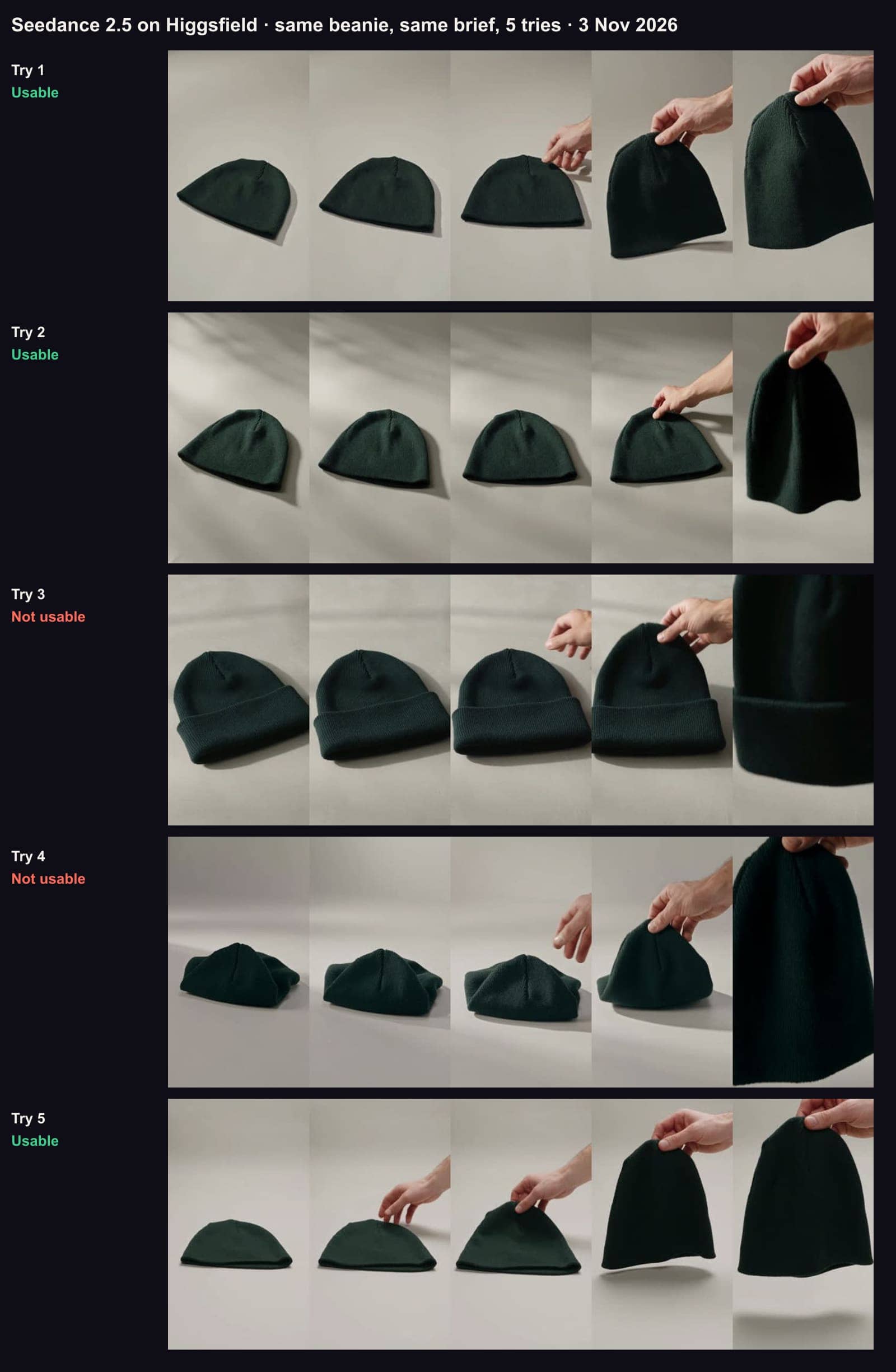
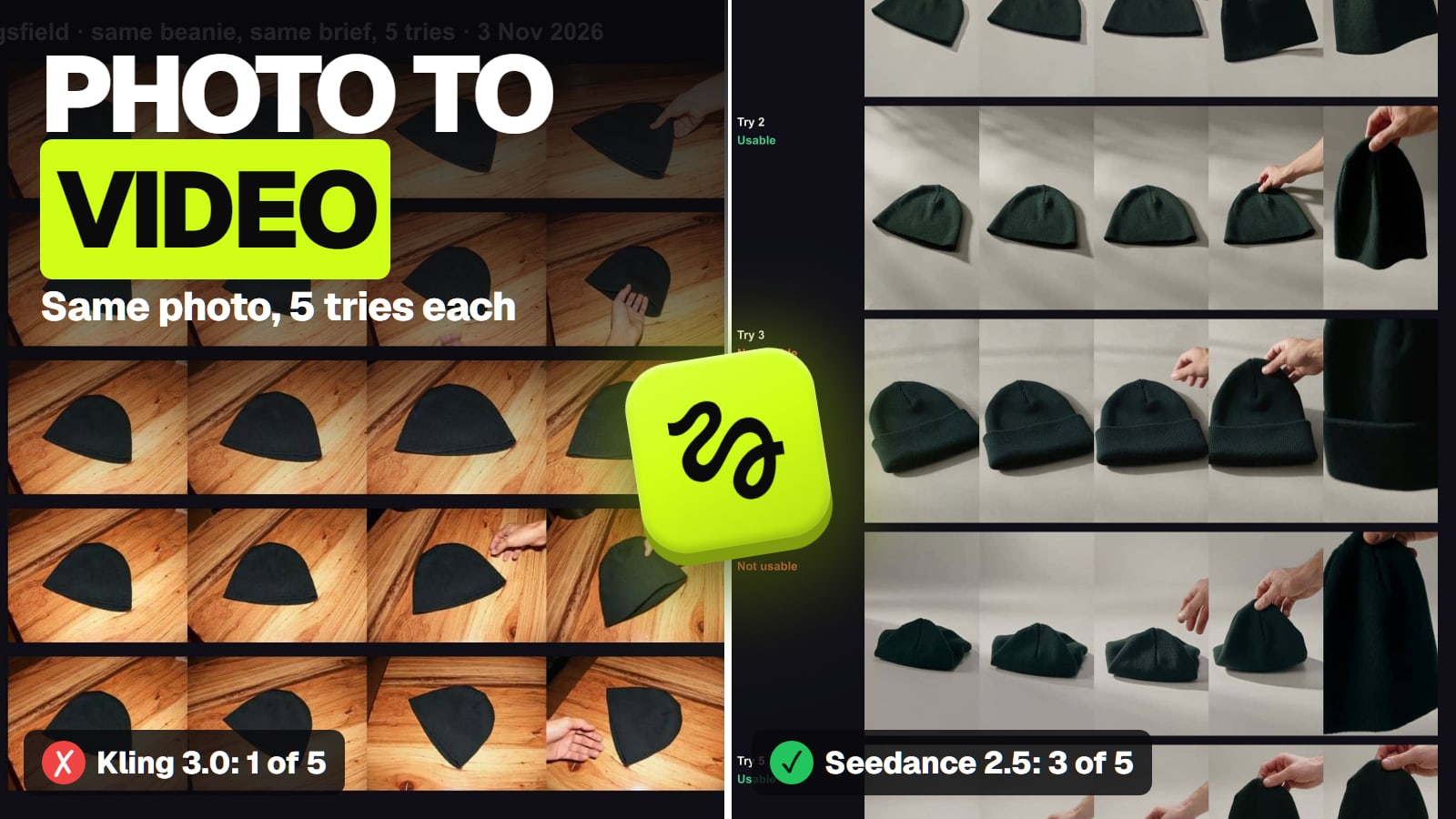
Seedance 2.5, five tries of the same brief, November 3, 2026. Tries 1, 2 and 5 kept the product; try 3 added a cuff, try 4 collapsed the hat. · Aliteq test, made with Seedance 2.5 on Higgsfield
An added detail. Seedance try 3 gave our plain, uncuffed beanie a folded cuff. Plain products invite the model to "improve" them.
A collapsed shape. Seedance try 4 started with the hat crumpled into a pinched mound.
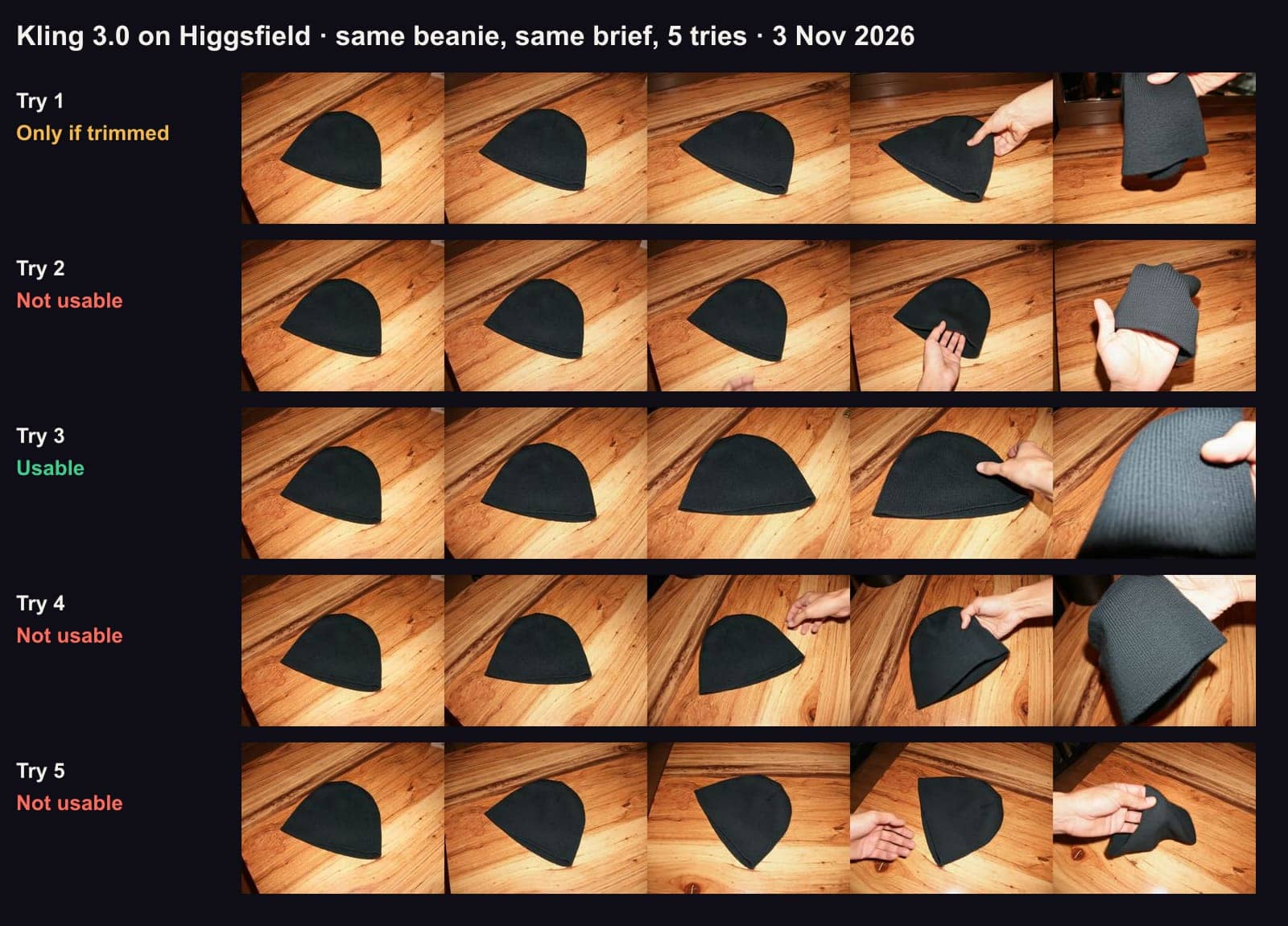
The last second. Three of Kling's failures looked right for about 3.5 seconds, then the hat stretched, turned grey or twisted as the hand lifted it. One is usable if you cut the last second.
A stray object. Kling try 4 grew a dark object at the edge of the frame.
Kling 3.0, five tries of the same brief, November 3, 2026. Frames at 0, 1.25, 2.5, 3.75 and 5 seconds. Every try kept the photo's wooden table and landscape shape. · Aliteq test, made with Kling 3.0 on Higgsfield
The habit that saves the most money: scrub to the final frame before you approve a clip. Our bad clips mostly went wrong at the end, when a hand touched the product.
Start frame or reference: which way should your photo go in?
This is the decision that shaped our results more than the model did.
As a start frame, the first frame of the video is your photo. Kling 3.0 used it that way and kept the wooden table, the flash lighting and the photo's landscape shape, although the brief asked for a vertical grey studio. xAI's docs say the same of Grok Imagine: an image-to-video clip "always matches" the still's aspect ratio. Use this when your photo is already the shot you want, on the background and in the shape you'll post.
As a reference, the model looks at your photo and builds a new scene. Seedance 2.5 used it that way and followed the brief. Its omni reference takes up to 30 images, 10 video clips and 10 audio clips in one pass, per ByteDance's page. Kling 4.0 takes up to 10 reference images and 10 keyframes per Kling's guide (on Higgsfield, images, videos and up to 7 Kling elements). Use this when you need a new setting, a new shape or several angles of the same product.
If you want Kling's lower price and a new background, fix the photo first: make a clean product shot on the background you want, check it, then animate it. Our one-phone-photo product shot test shows how often image models change a product in that step too.
Which model keeps a logo readable?
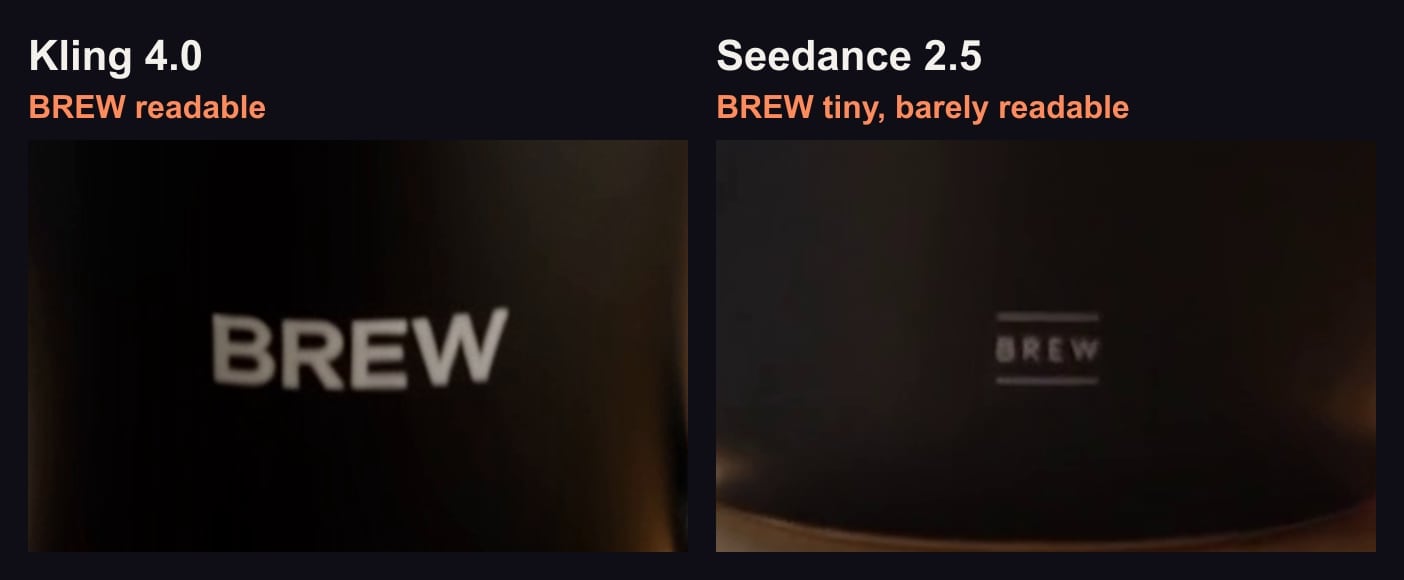
Kling 4.0, on the one test we have. On November 7 we gave Kling 4.0 and Seedance 2.5 the same text prompt for a branded mug, one try each, at 720p and 9:16:
Same prompt, one try each, unedited, Nov 7, 2026: the 2.5-second frame of each 720p clip, cropped around the logo and enlarged 2x at the same scale. Cut from our clips; nothing was generated for this image. · Frames from our own Higgsfield test clips
Kling 4.0's logo came out clear but larger than we asked for; Seedance 2.5's was barely readable at 720p. Kling's clip cost 11.25 credits and took about 3 minutes; Seedance's cost 35 and took about 6. One try each isn't a ranking, and that was text-to-video, not your real logo from a photo, so treat it as a lead to check. Kling vs Seedance shows both clips frame by frame.
One more thing for branded products: Higgsfield's help center lists "branded product names or logos used as subjects" among the things that can trigger its copyright block. If your own brand gets blocked, the article says an "I own the rights for this image" button may appear on eligible inputs.
What does one usable product clip cost?
Divide each plan's price by its credits, then multiply by the credits per usable clip from our test:
One usable 5-second product clip, by model and Higgsfield plan (our test and arithmetic, Nov 3 to Nov 7, 2026)
Kling 3.0, Ultra billed yearlyabout $1.24
37.5 credits per keeper at $0.033
Kling 3.0, Plus monthlyabout $1.84
37.5 credits at $59 for 1,200
Seedance 2.5, Ultra billed yearlyabout $1.93
58.3 credits per keeper at $0.033
Seedance 2.5, Plus billed yearlyabout $2.28
$47 a month for 1,200
Seedance 2.5, Plus monthlyabout $2.87
These assume you use every credit in the month. Higgsfield's Starter card says it covers "selected models only" and lists Seedance 2.0 Fast and 2.0 Mini, not Seedance 2.5, so for Seedance 2.5 the cheapest route is Plus ($59 a month, or $47 billed yearly). The same clip costs differently elsewhere; AI video cost per clip by app, API or rented GPU does that sum across routes.
How do you get more usable clips per try?
Fix the photo first. A clean, well-lit product photo on the right background gets a start-frame model like Kling closer on the first try.
Ask for less motion. Most of our failures happened when a hand touched the product. A slow orbit with no hands is a safer shot.
Check at 480p, finish at 720p. Seedance 2.5 costs 15 credits for 5 seconds at 480p, against 35 at 720p, so a cheap pass shows you whether the product holds. (Higgsfield's changelog says Seedance 2.5's separate Draft Mode is available in all regions except the US.)
Trim instead of re-rolling. One of our five Kling clips was right for 3.5 seconds; a 3-second cut is often enough for an opener.
Turn sound off on Kling 3.0 if you'll score it later: 7.5 credits without sound, 10 with it.
Which one should you use for product videos?
The product must look exactly right in a new scene: Seedance 2.5, with your photo as a reference, on Plus or Ultra.
You already have the hero photo and only need motion: Kling 3.0 with the photo as its start frame, the cheapest per keeper in our test.
A logo, label or printed text has to read: start with Kling 4.0 and check the logo frame at full size.
Ads built from those clips: check commercial rights and ad shapes per plan; Higgsfield commercial use covers the terms on Higgsfield.
A person holding and talking about the product: that's a UGC-style ad, a different workflow; our Higgsfield UGC ads guide covers it.
The best AI video generator for other jobs
Each page below answers one job from the same checked facts. All of them, grouped by job, are in our best AI video generator guide.
Best AI video generator for ads: A paid Higgsfield plan: its terms allow ads and client handover; Kling 3.0 tests a 5-second hook in any shape for 10 credits.
Best image to video AI: Seedance 2.5 to put your photo's subject in a new scene; Kling 3.0 when the photo is already the first frame.
More than one product. Our test used one soft knit hat. Bottles with labels, glossy or transparent products will fail differently.
Kling 4.0 and Veo 3.1 on a real product photo. Kling 4.0's logo result came from a text prompt, one try. We haven't run Veo 3.1, Grok Imagine or Wan on a product.
A bigger sample. Five tries per model could come out 2 of 5 or 4 of 5 on another day.
Every frame. We judged five frames per clip, so a brief glitch between them could have slipped through.
When Kling 4.0's discount ends. Higgsfield listed Kling 4.0 at 13.75 credits with 11.25 charged on November 7 and doesn't say for how long.
Verdict
Seedance 2.5 for accuracy, Kling for price
For product videos made from your own product photo, Seedance 2.5 on Higgsfield kept the product right most often in our test (3 of 5) and follows a brief for a new scene, at about 58 credits per usable clip. Kling 3.0 is cheaper per keeper when your photo is already the shot. For a logo or label, try Kling 4.0 first. Whatever you pick, check the last second of every clip.
Best for: Online stores and brands turning product photos into short videos
Questions about AI product videos
What is the best AI video generator for product videos?
In our 10-clip test on Higgsfield (Nov 3, 2026), Seedance 2.5 kept the product right in 3 of 5 tries and Kling 3.0 in 1 of 5. Seedance is the pick when accuracy matters; Kling 3.0 is cheaper per usable clip when your photo is already the shot.
Can AI make a product video from one photo?
Yes. Image-to-video models take your product photo either as the first frame (Kling 3.0, Grok Imagine) or as a reference for a new scene (Seedance 2.5, Kling 4.0). In our test, 4 of 10 clips from one photo were usable.
How much does an AI product video cost?
About 37.5 credits per usable 5-second clip on Kling 3.0 and 58 on Seedance 2.5 in our test, roughly $1.24 to $2.87 depending on the Higgsfield plan, assuming you use all your credits.
Why does the AI change my product?
Video models redraw the product in every frame. In our test the common changes were an added cuff, a collapsed shape and a twist in the last second when a hand touched the product. Less motion and no hands help.
Which AI video generator keeps a logo readable?
In one try each on Nov 7, 2026, Kling 4.0 drew a mug logo large and clear at 720p while Seedance 2.5's was barely readable. Check your own logo at full size before you commit.